Showing posts with label AndroidDev. Show all posts

December 30, 2024

Top 4 for 2024

Here are the top 4 highlights of this year for me, in no particular order.

New App: MP2 Calculator

I released a new app called MP2 Calculator on Android and on the web (https://mp2calc.sweldongpinoy.com). MP2 Calculator is an app for computing how much your MP2 (Modified Pag-IBIG 2) savings may grow based on actual dividend rates. I have built the MP2 Calculator Android app using Kotlin and Jetpack Compose and the app is now my first to be developed using 100% Jetpack Compose.

Fastest Half Marathon, First 8k

I ran my best (so far) half marathon at the Vancouver Half Marathon 2024 with a record of 2:10:52. It was a few minutes faster than the previous record I had, which was at the same race last year.

I also ran my first 8k at BMO Vancouver Marathon 2024.

Play Store Listing Certificate

After the previous certificate expired this year, I took again Google Play Academy’s Play Store Listing Certificate.


Work in Progress

I have been working on an app with a startup based in France which we have released publicly this year. My co-authors and I am also working on the third edition of our book How to Build Android Apps with Kotlin, which should be available soon on Packt and on Amazon.

I also released updates to my apps and projects, including the 2025 changes for Sweldong Pinoy and Budget Pinoy and toll fee increases for Toll Pinas.

December 29, 2023

2023: A Year of 3s

2023 has been a very unique year. The first three months was good but the remaining 3 quarters was not as good. Speaking of three, I have noticed that a lot of things related to the number 3 to me happened this year. Here are some of them:

Third Continent

After living and touring around Asia and North America, we finally visited a new continent this year: Europe. I was invited to the PE Summit 2023 in London, England and we toured around a few days before the summit. We went to the Prime Meridian, ate English breakfast, and went to Sherlock Holmes Museum, Warner Bros. Studio Tour London - The Making of Harry Potter, British Museum, and more. I also got to meet my three co-authors (who are all based in England) for the first time since we started working in 2019.
Book #3

My third book, the second edition of our book How to Build Android Apps with Kotlin, has been released last May. It is available on Packt and on Amazon. The first edition was published on February 2021 and there has been some new changes with the new one.

Three Runs

I ran thrice this year: a half-marathon at BMO Vancouver Marathon 2023, another half-marathon at Vancouver Half Marathon 2023, and a 10k at Under Armour Eastside 10k 2023. My half marathon at the Vancouver Half is now my fastest (so far) at 2:16:41.

3 Other 3's

  • Third Year of Blood Donation: This year marks the third consecutive year that I had donated blood.
  • Three Visits to the US: We went to the United States thrice this year: a weekend in California (March-April), a day trip in Seattle (June), and another weekend in California (November).
  • 3 VWFC Games: We watched 3 Vancouver Whitecaps FC matches at BC Place this year:
    • March 8: CONCACAF Champions League game against Real Club Deportivo Espana. Whitecaps won the game 5-0. It was our first time to watch their game where they scored more than 3 goals.
    • August 4: Leagues Cup Round of 32 match vs Tigres UANL. The final score was 1-1 but they lost on the penalty shootout 5-3
    • November 5: MLS Cup Playoff First Round Game 2 vs LAFC. They lost 1-0 and exited the playoffs


3 Honorable Mentions of Non-3 Things

  • After more than 8 years, I was finally able to replace my Macbook!
  • I joined two organizations this year and have already volunteered twice for each organization.
  • We watched our first NFL game in person in November, the Detroit Lions at Los Angeles Chargers (SoFi Stadium).

May 3, 2023

Second Edition: How to Build Android Apps with Kotlin

The second edition of our book, How to Build Android Apps with Kotlin, has now been published. There are additions and updates to the first edition which was published on February 2021.

This book starts with the fundamentals of app development, enabling you to utilize Android Studio and Kotlin to get started with building Android projects. You'll learn how to create apps and run them on virtual devices through guided exercises. Progressing through the chapters, you'll delve into Android's RecyclerView to make the most of lists, images, and maps, and see how to fetch data from a web service.

You'll also get to grips with testing, learning how to keep your architecture clean, understanding how to persist data, and gaining basic knowledge of the dependency injection pattern. Finally, you'll see how to publish your apps on the Google Play Store.

You can get your copy of the book on Packt and on Amazon.

July 30, 2022

New Book: Simplifying Android Development with Coroutines and Flows

The new book I have written, Simplifying Android Development with Coroutines and Flows, has now been published. This is my first book after last year's How to Build Android Apps with Kotlin that I co-authored.

The book begins by showing you how to create and handle Kotlin Coroutines on Android. You'll explore asynchronous programming in Kotlin, and understand how to test Kotlin Coroutines. Next, you'll learn about Kotlin Flows on Android, and have a closer look at using Kotlin Flows by getting to grips with handling Flow cancellations and exceptions and testing the Flows.

You can check out the book on Packt and on Amazon.

December 31, 2021

Top Ten for 2021

The year 2021 has been another challenging year. The COVID-19 pandemic is still ongoing. We're still working from home. Here are my personal highlights for this year:

Vaccinated

Celine and I (and both our family) have been vaccinated and we're still safe and healthy.

First Book

The book I have co-authored, How to Build Android Apps with Kotlin, has finally beeen published last February. If you want to learn Android app development with Kotlin, you can check out our book on Packt and on Amazon.

Android Developer Challenge

I joined the first two weeks of Android Developer Challenge: Jetpack Compose and was one of the 500 winners for both challenges.

Google Play Store Listing Certificate

I took Google Play Academy’s Store Listing Certificate training, passed the exam, and got my certificate.


First (Virtual) Half Marathon

I did my first 21k on 2021! It was a virtual half-marathon at the BMO Vancouver Marathon 2021. I finished the run in 2:45:26. I'm looking forward to my first in-person half-marathon next year.

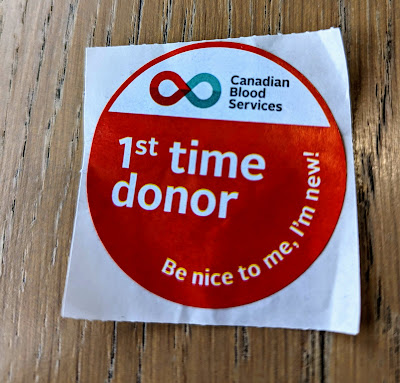
Blood Donation

It has been one of my goals since 2011. There has been a lot of factors in the past that made me unable to do it. I was finally able to do it this time before the year ended.

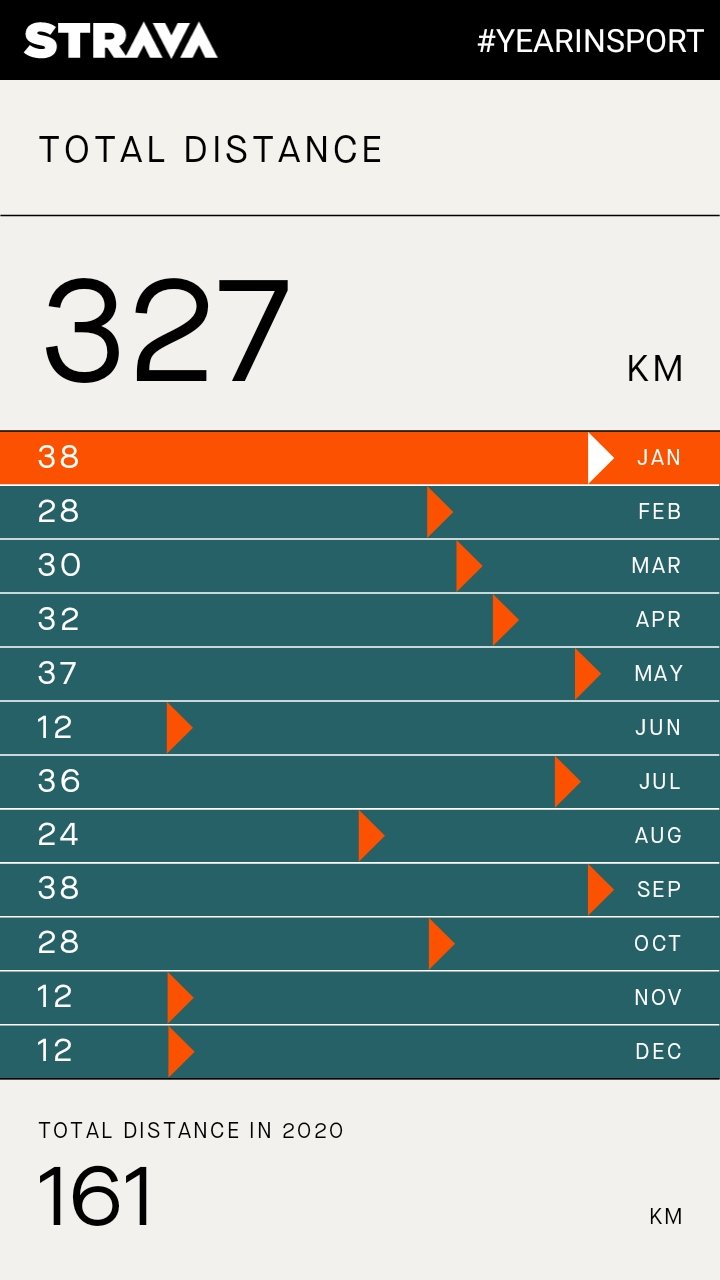
Montly Run

I ran at least once a month this year. My total distance is 327 km, twice as much as last year's 161 km.


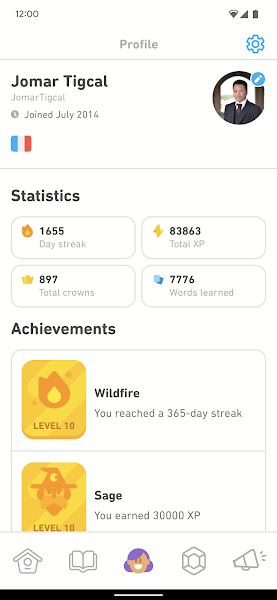
Le Français avec Duolingo

I extended my streak on Duolingo to 1655 days. In 4651+ minutes, I earned 18,750+ XP, got 157 more crowns, and "learned" 2256+ words.

Advent of Code, Kotlin Heroes

I tried Advent of Code for the first time. Using Kotlin, I was able to solve the first 15 days. I also learned some new things.


I also joined Kotlin Heroes 6 and Kotlin Heroes 7 this year. In the former, I solved a problem while in the latter, I got 2.

Victoria Trip

We were able to travel outside the city but within the province. It was our first time to visit the BC capital and we were able to visit different places and ate a lot of food. This trip happened when the cases were declining and the vaccination rate has been increasing so the province is starting to reopen.

November 20, 2021

Google Play Store Listing Certificate

One of the things announced at the Android Dev Summit 2021 is Google Play Academy’s Store Listing Certificate. The certificate is for app developers and evaluates knowledge of the best practices on creating Google Play Store listings, making them high-quality and policy-compliant, and marketing your app/games to a global audience.

I took the Play Academy training, passed the exam, and got my certificate:


April 30, 2021

Android Developer Challenge: Jetpack Compose

An Android Developer Challenge was announced during the beta release of Jetpack Compose. There are four weekly weekly challenges using Jetpack Compose to build Android apps. I joined the first two weeks and was one of the 500 winners for both challenges.

In the first week, the challenge was to build a puppy adoption app with an overview screen that displays a list of puppies and a detail screens. I made a simple app and got the images and details from BC SPCA. At the bottom of the details screen, I added an Adopt button that opens the link to the dog's details page on BC SPCA. I won a limited edition trophy of the Jetpack Compose superhero made of LEGO bricks.

The challenge for the second week was to create a working single screen countdown timer. My app is a simple one where users can set the hour, minute, and second and display the time remaining. Users can also stop the countdown and will be brought back to the "input" screen. Once the timer runs out, a "Time's up!" text will be displayed too. The prize was a Jetpack Compose poster and a set of Android pencils, and a limited edition Jetpack Compose comic strip poster.

I was able to learn and try Jetpack Compose by participating in the Android Developer Challenge. The prizes were additional bonus for me. I'll continue looking into Jetpack Compose and maybe I can use it in a project soon.

March 4, 2021

Co-Authored Book: How to Build Android Apps with Kotlin

The book I have co-authored, How to Build Android Apps with Kotlin, has finally beeen published last month. I have been writing blogs and tech articles for a while now but this is the first time for me to write a book. We have worked on this for months and it's feels great that it's now out for everyone to read and learn from.

With the book, you can build your knowledge, skills, and confidence by working on realistic examples, practical exercises, and challenging activities. If you want to learn Android app development with Kotlin, you can check out our book which is available on Packt and on Amazon.

I wrote a little more about my experience writing for the book here.

June 27, 2020

Android 11 Meetup with GDG Philippines

Google launched the Android 11 Beta with pages, videos, and other resources on June 10. They also announced the 11 Weeks of Android. Each week focuses on a specific topic and they will release more content relevant to it. Global developer communities will also host Android 11 Meetups to help developers learn and prepare for the new Android version.

GDG Philippines has invited me to be their speaker for their Android 11 meetup. I've done Android talks and workshops with them before. However, this time it is going be online, which will be the first time for me. I prepared a presentation about Android 11 and other relevant updates for Android developers.


The event was streamed live on YouTube and Facebook. I was a bit nervous because it has been years since the last time I gave a talk but it has been a great experience for me. It feels good to help out GDG Philippines and the Android developer community.

You can check the slides on Speakerdeck. If you need more information about Android 11, you can check out https://developer.android.com/preview.


February 15, 2018

My Android Developer Story

I started working full-time as a Java developer after graduating in 2009. It was around that time that I got to learn about Google developer technologies, especially Android. There weren't much Android phones yet but I had believed Android will be the future. A few months later (already 2010), I started loooking into the developer documentation and studying about developing Android apps.

In 2011, I bought my first Android phone: a Nexus S and subscribed to a Globe postpaid plan. Nexus devices then do not have a SIM tookit and Globe does not have an app for it. I decided to build a simple SIM utility app for personal use. Later, I added support for the other mobile networks and published it on Google Play as PHostpaid, a utility app for postpaid mobile phone services in the Philippines (Globe, Smart, Sun Cellular).

My second app was an Android app for GTUG Philippines (now GDG Philippines), which I am one of the community managers. Users can get the latest blog posts and messages in the mailing list. It was the first app I had published on the Android Market (now Google Play Store). I created a developer account on September 3, 2011 using an ATM debit card as I don't have a credit card to pay for the developer registration fee. Thirteen days after, I published the app. It was one of the first GTUG (now GDG) apps back then.

After these two apps, I started developing more apps and publishing them on Google Play Store.

onFocusChange

I decided in 2012 to move to a different company to focus on mobile app development. I have been doing Android on the side but it will be better if I will have firsthand experience on it. Working as an Android Developer will give me knowledge and skills from work and co-workers. I continued working on my personal projects and even looked for Android part-time projects and consulting jobs.

Starting 2012, I did talks and conducted workshops about Android app development, most of which are with Google Developer Groups. These talks/workshops are usually in schools and other events. I have been invited to judge Android development competitions and conduct some Android trainings for companies. With these talks, trainings, and workshops, I got to share my knowledge to others and inspired them to be Android developers like me. It made me learn more too. You can check out the list of my talks and workshops at http://talks.tigcal.com.


One of my Android talks and workshops

Android Apps

As of today, I have published nine (personal) Android Apps on Google Play Store. I also have Tigcal Utilities and an app for Celine (You and Me) there but these two are in Closed Alpha Testing. You can check out my apps at https://play.google.com/store/apps/developer?id=Jomar+Tigcal or in my Google Play Developer Page.

My Google Play Developer Page (Desktop view)


My Google Play Developer Page (Mobile view)

Android Gradle Extension

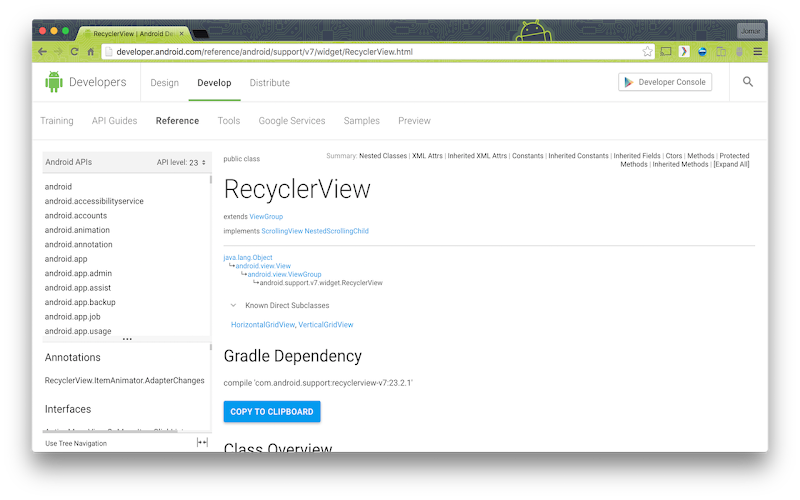
I have also developed a Google Chrome Extension, Android Gradle Extension, that adds Gradle dependency to use for Android API class reference pages at developer.android.com. Users can then copy the Gradle dependency text and use it in their codes. There is also a button to copy the text to the clipboard automatically.

Android Gradle Extension
My Android Gradle Extension at work

Continuous Learning

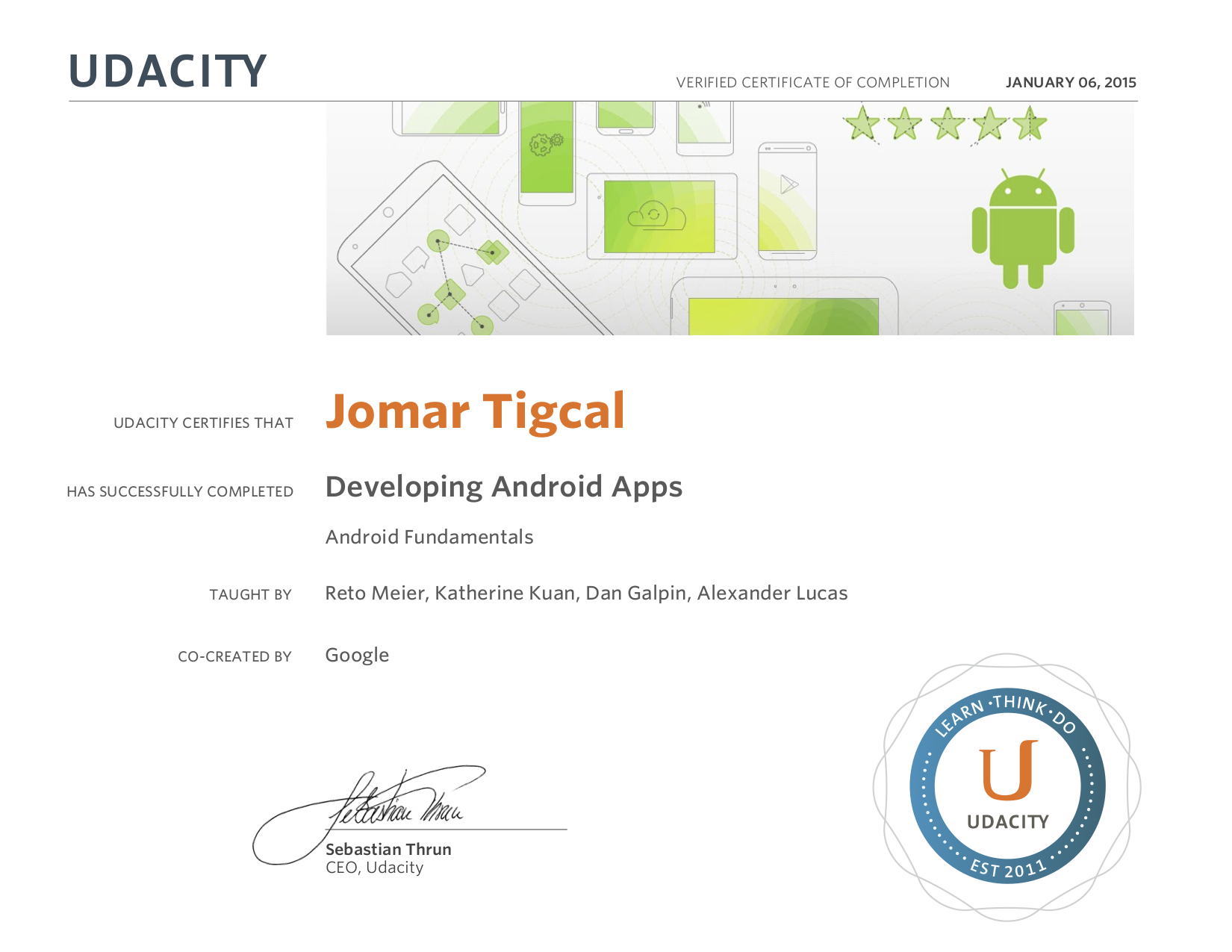
As Android is always evolving, I'm also keeping myself up-to-date with the latest Android developer news. I read Android developer blog posts and articles and watch relevant videos. I also enroll in different Android online courses. During the Google Developers Study Jams in 2015, I finished Udacity's Developing Android Apps (Android Fundamentals) Course as one of the facilitators for the GDG Philippines Android Fundamentals Study Jams. This year, I'm also planning to take the Associate Android Developer Exam and earn the certification.


Udacity Certificate of Completion

Looking back at my decision before, I am happy I decided to be an Android developer. I have been able to develop apps that I need or that others can use. It feels great that Android users are downloading my apps and using them. And reading reviews and messages from users that my apps have helped or are helping them gives me inspiration to improve my existing apps and develop more.

By the way, if you are in need of an Android developer or consultant to help you develop your app, you can send me a message.


June 11, 2017

Google I/O 2017: What's New for Android Developers

Google I/O 2017 was held in Shoreline Amphitheatre, Mountain View, California on May 17-19. There were a lot of announcements and new stuff from the event. Here are some of the new things relevant for Android developers:

Android Go

Android Go is Android (starting with the O release) optimized to run smoothly on entry-level devices. Google will also design their apps to use less memory, storage space, and mobile data (like YouTube Go).

Project Treble

Also starting with the O release, Project Treble is a new Android framework designed to help reduce the time and effort it takes device makers to upgrade a phone to a new version of Android.

Android O Developer Preview

The next version of Android, Android O, has beta-quality developer preview now. Android O includes changes like Notification channels and dots, Picture-in-picture, Smart text selection, Autofill, Adaptive icons, XML font resource, Downloadable fonts and emojis, Autosizing textviews, and more.


Developers can try the preview, the updated SDK, system images, and tools from developer.android.com/preview. They can also enroll their devices to Android Beta to get pre-release versions and automatically receive OTA updates.

Kotlin

Kotlin is now an officially supported language for developing Android apps. You can learn more about Android and Kotlin at https://developer.android.com/kotlin.


Android Architecture Components

Architecture Components is a set of Android libraries that help you structure your app in a way that is robust, testable, and maintainable. They also released a Guide to App Architecture, which you can use even if you won't be using Android Architecture Components .

Android Studio 3.0 Canary

Android Studio 3.0 is now available in the Canary Channel It includes Kotlin support, Java 8 language features, Layout editor, Adaptive icon wizard, XML fonts and downloadable fonts, Android Things Support, IntelliJ Platform Update, Instant Apps Support, Build Speeds Improvement, Google Maven Repository, Google Play System Image, Emulator openGL ES3.0 Support, Emulator App Bug Reporter, Emulator Proxy Support, Emulator Android Wear Rotary Controls, APK Debugging, Layout Inspector, Device File Explorer, Android Profiler, CPU Profiler, Memory Profiler, Network Profiler, and APK Analyzer Improvements.

Instant Apps

Instant Apps allow users to run Android apps without installations from search, social media, messaging or other deep links. Android Instant Apps is now open to all developers. You can learn more about Instant Apps at http://g.co/instantapps .

Google Play Console

Google announced several powerful, new features and reports in the Play Console to help developers improve their app's performance, manage releases with confidence, reach a global audience, and grow their business. These includes Statistics, Android Vitals, Release dashboard, Device catalog, App Signing, Pre-launch report, Retained installer data, Subscriptions dashboard, and Reviews analysis.


Videos and Codelabs

You can check this Playlist for the videos of Android-related sessions. There are also various codelabs for Android, Android Auto, Android TV, Android Wear, and more.


July 6, 2016

Firebase for Android Developers

At Google I/O 2016, Google announced that Firebase is expanding to become a unified app platform for Android, iOS and mobile web development. Firebase includes features and integrations designed to help you develop high-quality apps, grow your user base, and earn more money.

Firebase features work independently and you can choose the features that you need. At the heart of Firebase is Firebase Analytics, a free and unlimited analytics solution for mobile apps.


Develop

  • Cloud Messaging: Google Cloud Messaging (GCM) is now Firebase Cloud Messaging (FCM). FCM is a cross-platform messaging solution that lets you reliably send and receive messages to Android, iOS, or the Web at no cost.
  • Authentication: Firebase Authentication provided backend services to authenticate users via Google, Facebook, Twittter, and Github sign-in, email and password, and even custom auth system.
  • Realtime Database: Firebase Realtime Database is a NoSQL cloud database that syncs data across connected clients in realtime, even when your app becomes offline.
  • Storage: Firebase Storage, powered by Google Cloud Storage, provides easy, secure, and scalable uploads and downloads of images, audio files, videos, and other user-generated contents. It also gracefully handles poor network conditions.
  • Hosting:Firebase Hosting allows developers to quickly deploy web apps and static content to a secure content delivery network.
  • Remote Config: Firebase Remote Config is a cloud service that allows you to customize the look and feel of your app without downloading updates, via instantly-updatable parameters.
  • Test Lab:Cloud Test Lab is now Firebase Test Lab for Android. It is a platform where you can automate testing of your app on real devices hosted in Google data centers.
  • Crash Reporting: Firebase Crash Reporting gives you prioritized, actionable reports to help you diagnose and fix problems in your published apps.

Grow

  • Notifications: Firebase Notifications is a free service that enables targeted user notifications for Android and iOS devices without writing a line of code.
  • App Indexing: Firebase App Indexing, formerly Google App Indexing, brings new and existing users to your app from Google search.
  • Dynamic Links: Firebase Dynamic Links are smart URLs that work the way you want them to. They can link to different content depending on the platform they are opened and even persist across app installs.
  • Invites: Firebase Invites is a cross-platform solution for easily sending referral codes or content via personalized SMS or email invitations to their network.
  • AdWords: AdWords Google's advertising platform for user acquisition and engagement, is now integrated with Firebase.

Earn

  • Admob: Firebase is integrated with AdMob, Google's mobile advertising platform that allows you to monetize mobile apps with targeted, in-app ads.

Android Setup

Firebase runs on Google Play Services (9.2+) and is available for Android 2.3 and higher. To add Firebase in your Android project:
  1. Go to the Firebase Console. Create a new project or open an existing one. You can also Import Google Project if you already have one for your app.
  2. Click Add Firebase to your Android app and provide your app's package name (required) and signing certificate (optional).
  3. Download the google-services.json file and copy it to your project's module folder (app).
  4. Add classpath 'com.google.gms:google-services:3.0.0' in your project's build.gradle file.
  5. Add apply plugin: 'com.google.gms.google-services' at the bottom of your module folder's build.gradle file. Add the dependencies for the Firebase SDKs you want to use.

The Firebase SDK dependencies are in the com.google.firebase:firebase-x:9.2.0 format where x can be core (Analytics), database (Realtime Database), storage (Storage), crash (Crash Reporting), auth (Authentication), messaging (Cloud Messaging/Notifications), config (Remote Config), invites (Invites/Dynamic Links), ads (Admob). For Firebase App Indexing, the dependency is com.google.android.gms:play-services-appindexing:9.2.0


What's Next?

Try the Firebase Android Codelab and read the Firebase Docs to learn more about the new Firebase.


June 8, 2016

ConstraintLayout

One of the Android announcements at Google I/O 2016 was Android Studio 2.2 Preview, which includes the New Layout Editor and Constraint Layout.

ConstraintLayout is a new powerful and flexible Android layout that allows developers to create complex UIs without nesting multiple layouts. It is available in the Android Support Library and compatible with Android 2.3 (Gingerbread) and up. Using the new layout editor, which was built specially for ConstraintLayout will make it easier for developers to build Android UI.

Constraints describe how a view will be positioned relative to other elements in the layout file (another view, layout edge, or invisible guideline). The different types of constraints you can use are side connection with the layout, side connection with a view, side alignment with a view, baseline alignment with a view).

To use ConstraintLayout in your Android project, you should update Android Support Repository to version 32 or higher from the SDK manager, add compile 'com.android.support.constraint:constraint-layout:1.0.0-alpha2' in our Gradle dependencies, and Sync Project with Gradle Files.

Create a new layout by right-clicking your res/layout folder. Select New > Layout resource file. Type "android.support.constraint.ConstraintLayout" as the root element (auto-complete also works so you can type the Con... in the root element). The layout editor will then be displayed.


The New Layout Editor

The Design Mode and Blueprint Mode allows you to view the design mode, blueprint mode, or both. The https://medium.com/@jomartigcal/constraintlayout-b89f135bd537 is used for resizing the view by dragging the corners. Side Constraint Handle specifies the location of the view. The Baseline Constraint Handle aligns text fields' baselines. Constraints are visualized as arrows or lines between views or between a view and the edge of the layout. Autoconnect, when on, automatically calculates the constraints for the view you are adding in the layout. Infer constraints creates constraints for all views in a layout. Show No constraints hides the constraints while Clear Constraints delete them.

Check out the codelab at https://codelabs.developers.google.com/codelabs/constraint-layout to try and learn more about ConstraintLayout. You can also watch the Android Layouts: A New World talk at Google I/O.


June 2, 2016

Google I/O 2016: What's New for Android Developers

Google I/O 2016 was held in Shoreline Amphitheatre, Mountain View, California on May 18-20. There were a lot of announcements and new stuff from the event. Here are some of the new things relevant for Android developers:

Android N Developer Preview

Preview 3 of the Android N Developer Preview is already beta-quality. Android N includes Multi-window, Direct Reply from notifications (via RemoteInput API from Android Wear), Bundled notifications, Java 8 support, Doze improvements, JIT Compiler, Vulkan, and more.


Developers can try the preview, the updated SDK, system images, and tools from developer.android.com/preview or via Android Beta. By enrolling devices to Android Beta, they can try pre-release Android versions and automatically receive OTA updates as soon as they are available.

Android N also provides high quality mobile virtual reality (VR) experience. You can use a Nexus 6P with N Preview 2 to setup a Daydream Development kit (as a headset phone). Daydream is Google's new platform for low-latency, immersive, and interactive mobile VR.

Android Studio 2.2 Preview

A big update to Android Studio was announced at I/O. This includes the New Layout Editor and Constraint Layout, Layout Inspector, Firebase Plugin, Expanded Android code analysis, Code Sample Browser, Espresso Test Recorder, APK Analyzer, Merged Manifest Viewer, and Enhanced accessibility. There's also Enhanced Jack compiler with Java 8 support and Expanded C++ support with CMake and NDK-Build.


Android Studio 2.2 is available for download in the Canary Channel.

Android Wear 2.0

The biggest update to Android Wear, Android Wear 2.0, was announced at I/O. Android Wear apps can now be standalone. There are also a number of UI changes: complications, keyboard and handwriting input methods, new notification templates. Android Wear 2.0 also include improved Google Fit platform, support for Android N, and Material Design guidelines.


You can try the Android Wear 2.0 Developer Preview at http://g.co/wearpreview.

What's new in Google Play

Android apps that are in open beta but aren't in production yet will soon appear on search results on Google Play and users will be able to opt-in from there. There will also be a new featured section called Google Play Early Access for these apps. Some of the other Google Play announcements include Pre-launch report (summary of issues found on a wide range of devices when alpha/beta testing your app on Firebase Test Lab for Android), Review benchmarks, review topics, Reply to Reviews API, User acquisition data by country and (soon) benchmarks compared to similar apps), and Pricing templates and price rounding.

To get your Android apps or games ready to meet the needs of billions of Android users globally (especially to those in emerging markets), they have released Building for Billions Guidelines and The Building for Billions Playbook.

Two new Play apps have also been announced: Google Play Developer Console App and Playbook by Google Play (in beta), where you can learn about the latest Android features, tips, best practices that will help you develop and launch your app, engage and grow your audience, and earn more revenue on Google Play.

Instant Apps

Instant Apps allow users to run Android apps without installations from search, social media, messaging or other deep links. It is compatible with all Android devices with Google Play services and running Jellybean (4.1) or higher. You can learn more about Instant Apps at http://g.co/instantapps .

Google Play Services 9.0

Google Play Services 9.0 include update to Ads, Nearby API, Player Stats API, and Video Recording API.
  • Ads: new SDK initialization, Native Ads Express
  • Nearby API: BLE beacon scanning without additional permissions, opt-in dialog connection for Nearby Messages
  • Player Stats API: Predictive Analytics
  • Video Recording API: add and share video recording

Android Apps on Chromebooks

Chromebooks will soon support the Google Play Store and Android apps. You can update your app so that it will be available on Chromebooks. You can read more about how to optimize your Android apps here.

Videos and Codelabs

Videos of Android-related sessions are already in YouTube. You can check this Playlist for these videos. There are also various codelabs for Android, Android Auto, Android TV, Android Wear, and more.


April 21, 2016

Android Emulator + HAXM

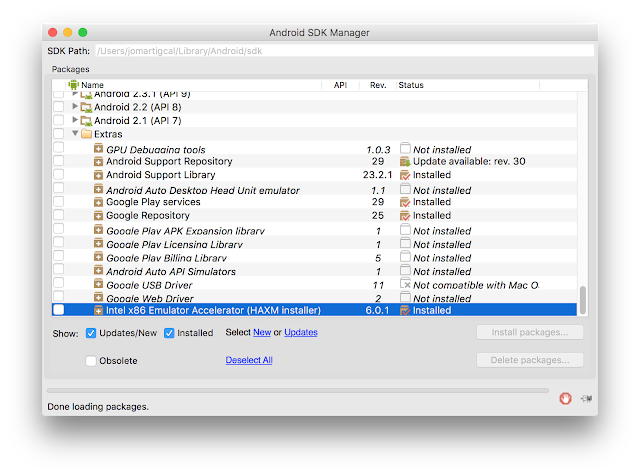
Have you tried creating an Android emulator and you've been prompted that it cannot launch because it requires hardware acceleration? When using an x86 system image for an Android Virtual Device (AVD), you should install HAXM (Hardware Accelerated Execution Manager). HAXM is a hardware-assisted virtualization engine (hypervisor) that uses Intel Virtualization Technology to speed up Android app emulation on a host machine.

HAXM can be installed through the Intel site or from the Android SDK Manager. Go to Extras and select Intel x86 Emulator Accelerator (HAXM installer) and download the package. Go to your SDK directory > extras > intel > Hardware_Accelerated_Execution_Manager and run the installer. Follow the on-screen instructions. You might need to enable virtualization in your BIOS setup for HAXM to work.


When running an x86 emulator, you should be able to see something like HAX is working and emulator runs in fast virt mode which means you have successfully installed HAXM. If you encountered something like Intel virtualization technology (VT-x) is not turned on, you should restart your computer and go to the BIOS setup. From there, you should enable Intel virtualization technology. If you still encounter problems, you can try any of the following:
  • Uncheck Hyper-V in Control Panel > Programs > Turn windows features on or off > Programs and Features then restart your computer
  • If you have Avast, uncheck Enable hardware-assisted virtualization and Enable avast self-defense module in Settings > Troubleshooting.
  • Go to My Computer. Right-click it then go to Avanced System Settings > Advanced > Performance > Settings > Data Execution Prevention. Enable DEP for all programs and services


April 7, 2016

Android Gradle Extension

Have you tried browsing the Android reference pages and tried to use classes only to find out you would need to add some lines to your Gradle dependencies? Sometimes, I do; that's why I developed a Chrome Extension for this.

Android Gradle Extension is a Google Chrome extension that adds Gradle dependency to use for Android API class reference pages. Users can then copy the Gradle dependency text and use it in their codes. There is also a button to copy the text to the clipboard automatically.

Android Gradle Extension

Android Gradle Extension works on class references at developer.android.com. In the future, I'll add reference pages for Google APIs for Android. If you are an Android developer, this Chrome Extension might be useful to you. You can download it now on Chrome Web Store. There might still be some bugs though in the extension. If you find one, please let me know so I can fix it.


March 28, 2016

Android N Developer Preview

Three weeks ago, Google released the first developer preview of Android N. In the past years, they announce the developer previews during Google I/O but this time they did it earlier.


Developers can now download Preview 1, the updated SDK, system images, and tools from developer.android.com/preview. Google has also announced Android Beta. By enrolling devices to Android Beta, they can try pre-release Android versions and automatically receive OTA updates as soon as they are available.

Some of the new features of Android N includes Multi-window, Direct Reply from notifications (via RemoteInput API from Android Wear), Bundled notifications, Java 8 support, Doze improvements, and more! Check out the video below for a summary of what's new:


November 28, 2015

Android Dev Summit

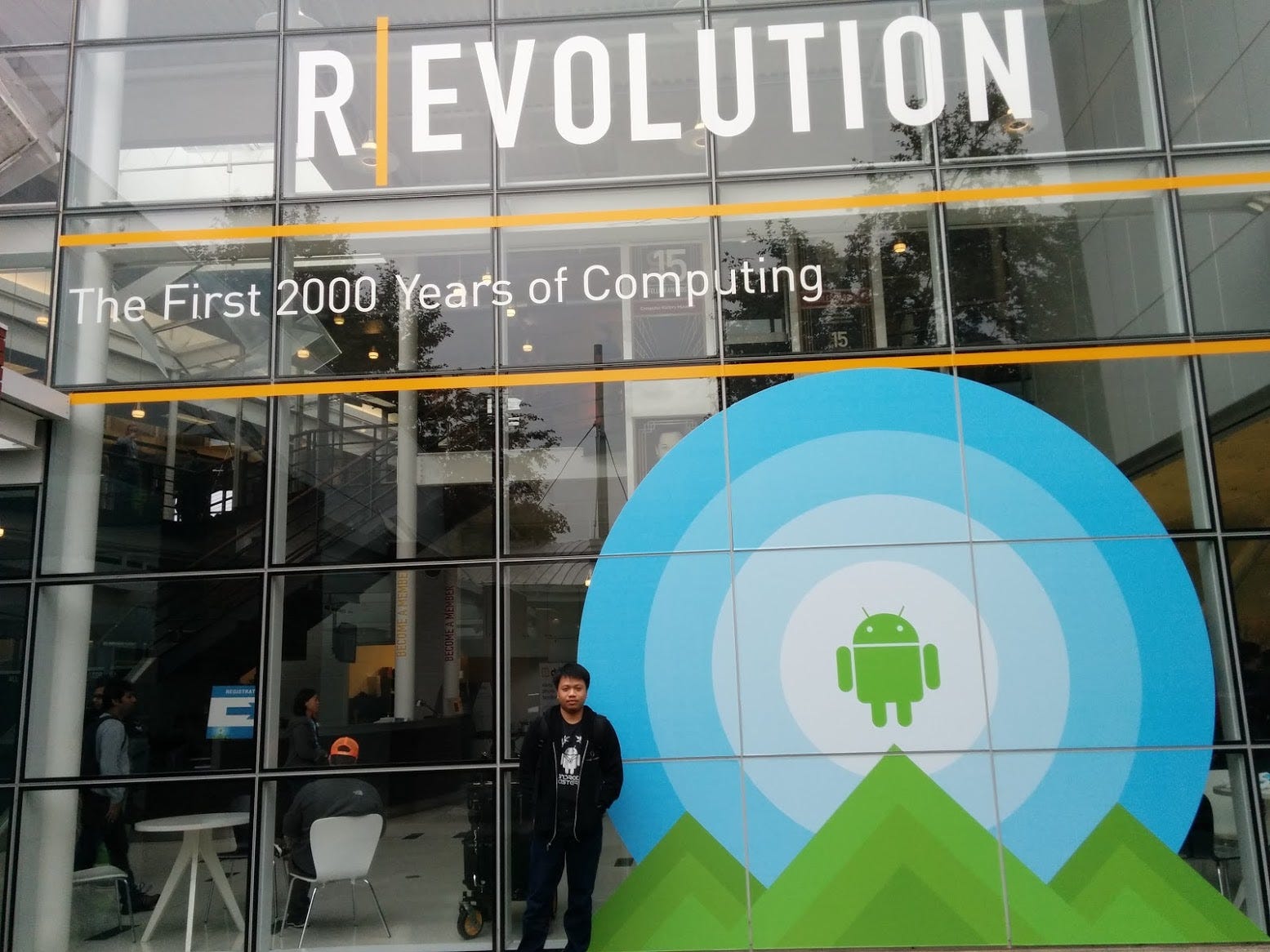
The inaugural Android Dev Summit was held on November 23-24 in Mountain View, California. A gathering for developers to learn and connect with the Google engineers behind Android, Android Dev Summit was composed of two days of deep technical sessions from and networking with the Android engineering team. Day 1 focused on framework skills while Day 2 was about tooling and performance.


It has been a great experience to be a part of the Android Dev Summit. The topics were good. Googlers from the different Android teams were there to answer questions from attendees during the office hours and to assist those who are doing the codelabs.


At the Computer History Museum

If you weren't able to join it live, you can check the codelabs at https://www.code-labs.io/android-dev-summit. Videos from Day 1 and Day 2 of Android Dev Summit have also been uploaded in the Android Developers YouTube channel.


November 16, 2015

Google Play Developer Page

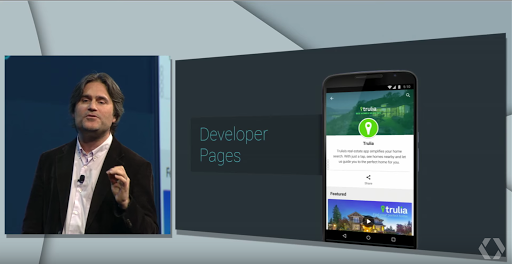
One of the things announced during Google I/O 2015 was Developer Pages for Android developers who have apps published on Google Play.


Google Play Developer Page announced during Google I/O 2015

A Developer Page helps promote your brand and apps on Google Play. Instead of the normal list of apps made by a developer, you can now create your branded page with your featured app and other apps. You should have at least one app to create a developer page.

Creating A Developer Page

To create your own Google Play Developer Page, follow the following steps:
  1. Go to the Google Play Developer Console
  2. Click the Gear Icon (Settings) on the left.
  3. Click Developer page.


  4. Click the Get Started button.

  5. Fill up the promotional text (brand description, required) and website (optional)
  6. Add a developer icon (512 x 512, 32-bit PNG) and a header image (4096 x 2304, JPG or 24-bit PNG [no alpha)
  7. You may also choose one of your apps to be featured on your page
  8. Click the Save button at the top of the page
It may take up to one hour for the Developer Page URL to be valid for preview and up to 24 hours for it to be displayed to Google Play users.

Updating A Developer Page

To update your developer page, simply follow the steps in creating one. It may take up to one hour for the changes to be published.

Deleting A Developer Page

If you wanted to delete the developer page that you have made, go to the Google Play Developer Console, click Settings gear icon, click Developer page and then click the Delete page button in the bottom of the site.

My Developer Page

A lot of Android developers have already made their Developer Pages. You can check Google's developer page here. I have also made my own developer page. It's still a work in progress. If you have comments or suggestions, please let me know!


My Google Play Developer Page (desktop view)


My Google Play Developer Page (mobile view)


November 14, 2015

Developing for Android Wear

Android Wear extends the Android platform to wearables. With Android Wear, you can add wearable notifications, create wearable apps, and create watch faces.


To start developing for Android Wear, you would need to download and setup Android Studio. You also need to download the following packages using your SDK Manager:
  • Tools > Android SDK Tools 23.0.0 or higher
  • Tools > Android SDK Platform-tools 23.0.0 or higher
  • Tools > Android SDK Build-tools 23.0.0 or higher
  • Android 4.4W (API 20) or higher > SDK Platform
  • Android 4.4W (API 20) or higher > Android Wear ARM System Image
  • Android 4.4W2 (API 20) or higher > Android Wear Intel System Image
You will also need to install the Android Wear app in your handheld device.

Setting up Android Wear Device

Pair your handheld to your Android Wear Device using the Android Wear app. Enable USB debugging on the wearable by tapping the Build number seven times (in Settings > About). Go to Developer options and enable ADB Debugging. You can connect the wearable to your computer via USB or via Bluetooth.

Setting up Android Wear Emulator

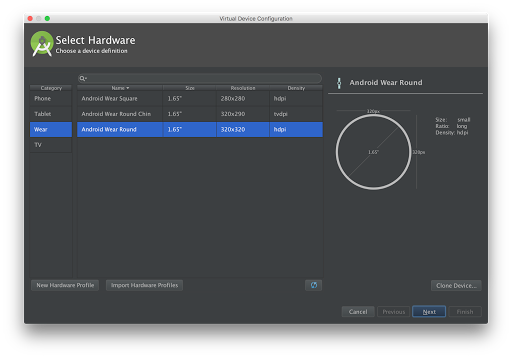
If you do not have an Android Wear device, you can create an emulator. To create an Android Wear Virtual Device:
  1. Open the AVD Manager and click the Create Virtual Device...
  2. Select Wear in the Category and choose between Square, Round Chin, and Round. Click the Next button.
  3. Select the release name (e.g. Lollipop) then click the Next button.
  4. Rename the virtual device (if you like) and change any coniguration based on your preference.
  5. Click the Finish button to create the emulator.


Creating an Android Wear Emulator

You can now start this emulator and pair it to your handheld. Connect the handheld to your computer via USB and run adb -d forward tcp:5601 tcp:5601 (this forwards emulator's communication port to the handheld). Open the Android Wear app in the handheld and connect it to the emulator.

Creating An Android Wear Project

To create a new Android Wear Project on Android Studio and follow the following steps:
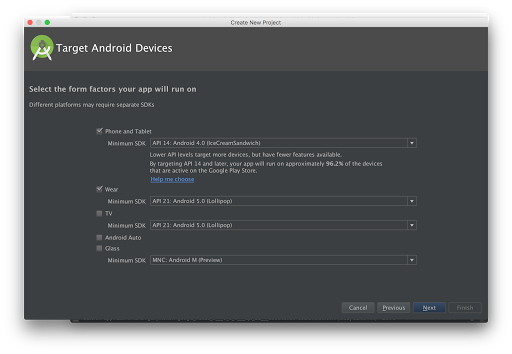
  1. Click New Project in the Welcome Screen (or File > New Project if you already have an open project).
  2. Fill up the project name and package name, then click the Next button.
  3. Check Phone and Tablet and select the Minimum SDK.
  4. Check Wear and select API 20: Android 4.4 (KitKat Wear) or higher as the minimum SDK
  5. Click the Next button.
  6. In the Add activity to Mobile window, select Blank Activity then click the Next button. You can change the activity name, layout name, and title.
  7. In the Add activity to Wear window, select Blank Wear Activity then click the Next button. You can change the activity name, and the layout names.
  8. Click the Finish button.


Creating an Android Wear Project

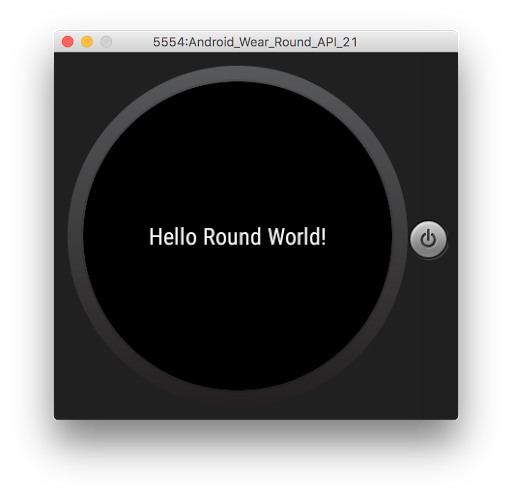
Run the mobile module to run it in your phone or tablet device (or emulator). To run and view the wearable app, run the wear module and choose your emulator. You will see something like the one below:


To learn more about developing for Android Wear, take Udacity's Android Wear Development course, built by Google. You can also join the Android Wear Developers Google+ Community