Showing posts with label Chrome Extension. Show all posts

April 7, 2016

Android Gradle Extension

Have you tried browsing the Android reference pages and tried to use classes only to find out you would need to add some lines to your Gradle dependencies? Sometimes, I do; that's why I developed a Chrome Extension for this.

Android Gradle Extension is a Google Chrome extension that adds Gradle dependency to use for Android API class reference pages. Users can then copy the Gradle dependency text and use it in their codes. There is also a button to copy the text to the clipboard automatically.
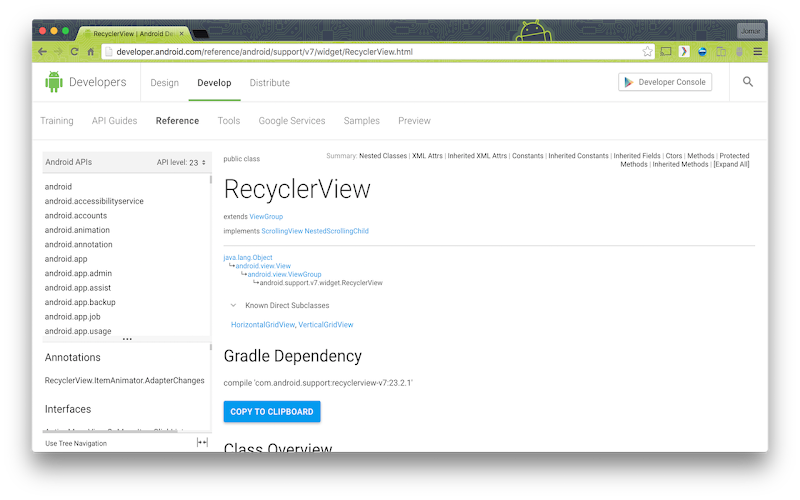
Android Gradle Extension

Android Gradle Extension works on class references at developer.android.com. In the future, I'll add reference pages for Google APIs for Android. If you are an Android developer, this Chrome Extension might be useful to you. You can download it now on Chrome Web Store. There might still be some bugs though in the extension. If you find one, please let me know so I can fix it.


November 28, 2013

Kota Kinabalu Day 1

+Celine, Mama +Chelle, +Wayne,  Mitch, +Svetlana and I went to Kota Kinabalu last November 16-18 to help GDG Kota Kinabalu in their first GDG DevFest.

All of us, except Mama Chelle who went to KK earlier, arrived in Kota Kinabalu International Airport around one in the morning. +Lorna picked us up in the airport and brought us to King Park Hotel where we stayed for the night.

We wake up early in the morning and had breakfast in King Park Cafe. The venue for the DevFest, Wisma Bandaraya, is just two blocks away (around five minutes walk) from the hotel. We met some of the organizers there. I found out about the Ingress Sabah. They have a great cross-faction relationships there. I also got updates about the Shard in KK.

The event started with a speech from the Sabah State Minister of Resource & IT Development and the keynote by Sebastian. Mitch is the first from us to talk. Her topic is about Mobile Trends. After her talk, Mitch, Svet, Loretta and I walked to the nearby mall (Centre Point Sabah) to exchange our money to Ringgit. I also need to buy an adapter and a local sim for mobile data. I bought a Digi sim and loaded some credits to it. The cost for the unli data was a bit expensive than in the Philippines but I think it was worth it.

We went back and Celine's talk about Google Apps for Education is already finished. I sat inside for +Marc Tan's  Google ADK/Arduino talk. It was the last talk before lunch. In the afternoon, there were two breakout sessions: App Engine on PHP (by Lorna) and Chrome Extensions. I discussed the basics of Chrome Apps and Extensions development. Below is the presentation I used in my talk.


After that, +Loretta talked about HTML5 Game Development. Lorna then had the closing speech after a few short talks about GSA and Ingress Sabah. Over-all, the event and the food were great!

Mama Chelle, Wayne, Mitch, Svet, Marcus, Loretta, Marc, Celine and I had dinner at Welcome Seafood Restaurant. We enjoyed the different seafood dishes. Because some of us needed to buy shorts and slippers and other things, we went to Centre Point Sabah. We then went to Pasar Malam Sinsuran to buy keychains and other stuff. Afterwards, we had cakes at Secret Recipe before going back to the hotel to rest.


November 22, 2012

Pinoy Jokes Chrome Extension

After publishing my Pinoy Jokes Android App on Google Play, I worked on creating an extension for Google Chrome. It took a while for me to come up with the initial version but now the Pinoy Jokes Chrome Extension is now available on the Google Chrome Web Store. I plan to update this as I update the Android App.

If you still haven't installed the Android app, download it now on Google Play.

November 19, 2012

Radio and TV Interview

Celine and I were invited by Michelle Orosa-Ople of TV5 for an interview last November 10, 2012. Michelle is one of the hosts of the radio program Oplan Asenso (airing every Saturday from 12:00 NN to 2:00 PM) on Radyo5 92.3 News FM. Their topic that day was salaries and deductions. We talked about our Android app Sweldong Pinoy.


Celine and me with the hosts of Oplan Asenso, Michelle Orosa-Ople and Gerard dela Pena

After the radio program, Michelle also interviewed us for TV5 news. This was aired on TV5's Pilipinas News and Aksyon TV's Andar ng mga Balita last November 14, 2012.

April 11, 2012

Sweldong Pinoy

A few months ago, Celine asked me to make an app she can use in computing the taxes and statutory deductions based from a specific salary. There wasn't an existing app yet for that purpose. Since it will not only benefit her (and me), but a lot more too, I decided to start developing the app. However, due to time constraints and because of the complicated processes in computing the taxes and deductions, it took a long while to develop the app.

Last week, I have finished the prototype of Salary Calculator. It is an online tool for Filipinos that they can use to compute their net pay, withholding taxes and contributions to SSS, Philhealth and PAG-IBIG. Users just need to provide their basic pays, and allowances (taxable and non-taxable allowances), as well as the rate (semi-monthly, monthly or annual). Then with just a click of the "Compute" button, the app will display the gross pay, withholding tax amount, net pay and the deductions for PAG-IBIG, SSS, and Philhealth. The withholding tax was computed based from the monthly taxable income using the BIR Revised Withholding Tax Table. The computation of the other deductions are based from PhilHealth Contribution Table, SSS Contribution Table, and Republic Act No. 9679 (for the PAG-IBIG contributions).

The app can be accessed at http://sweldongpinoy.tigcal.com and is still a work in progress. Try the app and please give comments and suggestions.

Update: The app is now called Sweldong Pinoy and is now also available on Chrome Web Store. We've also made an Android app which can now be downloaded on Google Play.

Update (December 19, 2012): The app is now at http://www.sweldongpinoy.com. The previous URLs redirect to this website now. We'll also be publishing an update to the app in connection to the increase in the PhilHealth contribution (see PhilHealth Circular 11 s. 2012 for details). For updates, you may also follow @sweldongpinoy on Twitter. Thank you very much for using the app!

Update (March 28, 2013): We already have a blog at http://blog.sweldongpinoy.com. We'll be posting news and updates about the app there.

December 29, 2011

Top 11 for 2011

Just as I had done in the past two years, I am making a year-ender blog post for this year. This time, however, I am doing something different. Instead of listing (almost) everything, I have decided to write down my top eleven.

  1. One of my wishes in life finally came true.
  2. I have developed my first (published) Android app, the GTUG Philippines Android App. GTUGers can use the Android app to get updates in the blog and mailing list. It also contains links to the various GTUGPH accounts and sites.
  3. I have created my first Chrome extension, the GTUG Philippines Chrome Extension. Using this extension, users can view the latest posts in the group blog, the calendar of group events, Twitter feeds and links to the group's web presence.
  4. I had finally experienced giving a talk to an audience. Last July 20, in the GTUG Philippines' HTML5 and Google Chrome Extensions meetup, I presented and gave a talk entitled "Introduction to Google Chrome Extensions Development." The slides and video are available here.
  5. I bought my first Android smartphone. Last June, I bought a Google Nexus S smartphone. I wanted an Android phone because I've been becoming to be more serious in Android development. Also, my old Nokia phone is starting to give up on me.
  6. I had purchased the tigcal.com domain name. I bought tigcal.com from GoDaddy in June and setup Google apps on it. I had also made subdomains, like the one for this blog.
  7. I had already applied and received my passport. Last August, I went at the DFA Office of Consular Affairs to apply for my passport. The month after, it was delivered at the O&B office.
  8. I have subscribed to a Globe postpaid plan. Before buying an Android phone, I decided to apply for a postpaid plan from Globe. It was a pretty fast process and I already got my SIM card and free phone on the day of the application itself. I gave the phone to my sister because I planned to buy a smartphone for myself.
  9. I have finished my first 3k, 5k, 10k and 16k runs. From February to July, I have been consistent in running at least once a week. I have missed running from August to September but I started running/jogging again on October. I have joined four running events this year and the summary of my runs is here. I am looking forward to my next runs on the coming days.
  10. This year, I had attended and joined a lot of non-work-related activities. This includes the following:
    • had an outing with officemates in Puerto Galera (March 26-28)
    • went to the Air Supply concert (May 12)
    • participated in our company outing at Kabayan Resort, Laiya, Batangas (May 14-15)
    • toured Fort Santiago (May 27)
    • watched Azkals vs. Sri Lanka Game (July 3)
    • watched Romeo and Juliet Play (July 8)
    • toured Manila Zoo (August 7)
    • watched The Little Shop of Horrors play (August 27)
  11. I have made some improvements in my daily routine. For a healthier lifestyle, I had stopped drinking softdrinks since March (except when it's mixed with alcoholic beverages) and tried my best to eat breakfast daily. I have started reading bible verses (almost) daily and attending mass at least once a month.

July 22, 2011

First Talk: Chrome Extensions

Last July 20, Google Technology User Groups Philippines (GTUGPH) held its meetup at the CodeFlux office (RCI Building, 105 Rada Street, Legaspi Village, Makati City). The first topic was HTML 5 which was presented by Brian Tan Seng and his teammates from 98 Labs, Inc. I was the second speaker and I presented Introduction to Google Chrome Extensions Development. Paolo Melendres also talk about KKB, an Android app from CodeFlux.
I talked about Google Chrome Extensions and also demonstrated the GTUG Philippines Chrome Extension. Now at Version 1.5, the extension gives users updates in the group blog, mailing list, calendar of activities, as well as links and the latest tweets.
Below is the presentation I used during my talk:


You can also view the slides here. The event was also streamed live using UStream. here is a recorded video of my talk (I still haven't watched it yet).


I met fellow members of the group, friends, and former officemates. It was also my first time to give a talk so I was a little bit nervous. My talk and the event turned out to be a success. I also received a lot of positive, inspirational and motivational comments about me and the talk. I would like to thank my officemates for the support, especially Celine for giving me encouragement and inspiration. I am hoping I can have more talks in the future.
To view more details about the meetup, visit the official blog of GTUGPH.


January 27, 2011

Presenting in the GTUGPH meetup

Last January 26, the Google Technology Users Group Philippines (GTUGPH) had its first meetup for the year at the Orange and Bronze office. It was a show-and-tell meetup where group members demo and present their apps built using Google Technologies.

During the meetup, I presented the GTUG Philippines Chrome Extension, a Google Chrome extension for users who want to be updated about the latest in the group. Users can view the latest posts in the group blog, the calendar of group events, updates from the group Twitter account, and useful links. It was my first time to present something and I was a little bit shy.

Aside from me, the following are the persons who presented their apps in the meetup:

  • Mike Mallete: whatzo.com, a social recommendations site
  • Brian Tan Seng: Open Map Charts
  • Tom de Leon and Mike Ng: 7-Elections
  • Butch Landingin: Orange and Bronze Maps Demo
  • Edge Dalmacio and Lorenzo Dee: Haybol.ph, a Google Maps & Philippine real estate mashup that runs on Google App Engine.

It was the first show-and-tell meetup of the group and there might be more of this kind soon. For details, you can check out the blog of GTUG Philippines.


January 7, 2011

First Chrome Extension

I just published my first Google Chrome Extension: the GTUG Philippines Chrome Extension. The extension is now available at https://chrome.google.com/webstore/detail/pbpopomlbomjpbmpfigaogeodiemmjbm or you can search for it in the Chrome Webstore.

Using this extension, you can view the latest posts in the group blog, the calendar of group events and useful GTUG Philippines links. As of now, the extension is just an initial version and I have a lot of plans on improving it. I am also very much open for comments and suggestions. After publishing my first Chrome Extension, I am thinking of doing more.

Update 1(January 14, 2011):
I just updated the Chrome Extension (now at version 1.1). There were only a few changes, mostly on the design. I am currently working on adding Twitter and Mailing List feeds, and will add other features soon.

Update 2(January 26, 2011):
I had uploaded the new version (1.2) of the GTUG Philippines Chrome Extension. It now has the Twitter feeds and there were some minor changes.

Update 3(February 12, 2011):
The Chrome Extension is now at version 1.3. I added avatars in the Twitter widget, moved images in a separate directory and added LinkedIn Group URL.

Update 4(April 14, 2011):
I continued the development of the Chrome Extension. I added the mailing list feeds and a few other changes. the latest version is now 1.4.